
Nonprofit Automation: How to Streamline Essential Workflows


Nonprofits are being asked to do more than ever, often with limited time, staff, and budgets.
What could your team accomplish if you could cut out the busywork and focus on what truly moves your mission forward? For many organizations, the answer lies in automation.
By reducing the time and attention routine tasks require, automation frees staff to focus on higher-impact, mission-critical work. And because the technology behind it is more affordable and accessible than ever, some form of automation is within reach of every nonprofit. In fact, you’re likely already using a few simple automations without realizing it.
In this guide, we’ll cover the essentials of nonprofit automation, including:
- Nonprofit Automation FAQ
- Popular Tools for Nonprofit Automation
- Nonprofit Workflows to Consider Automating
- Tips for Getting Started With Nonprofit Automation
- Additional Resources for Nonprofit Automation
Let’s begin by ensuring we’re on the same page about what exactly automation is.
Nonprofit Automation FAQ
What is Nonprofit Automation?
Nonprofit automation is any technology that minimizes the need for human input. It is typically applied to the most laborious duties—tasks that take a lot of time and energy but require very little insight, creativity, or strategic thinking.
Some degree of technical knowledge is helpful when setting up automations, but it’s not always required. Many database systems, productivity tools, and communications platforms include built-in automation features. In fact, your existing software probably includes automation tools you can start using right away.
What Types of Automation Can Nonprofits Benefit From?
Automation can support nearly every part of a nonprofit’s work, from back-office tasks to mission delivery. Most automations fall into one of five categories:
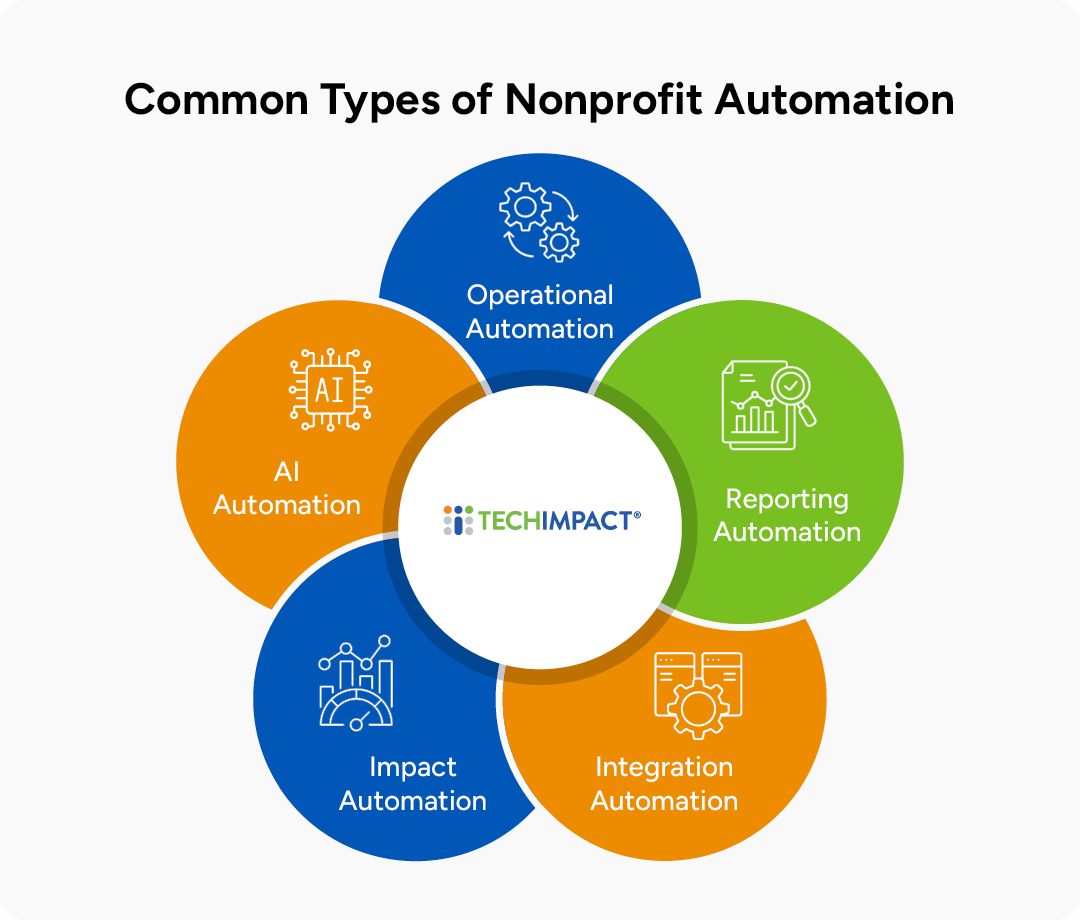
- Operational automation takes repetitive, manual steps off your team’s plate, such as saving files, cleaning up duplicate data, or routing approvals to the right people. For example, when someone donates, an automation can instantly send a receipt and thank-you message, then follow up with relevant events or resources based on their interests, all without any staff time.
- Reporting automation collects, cleans, and organizes data from multiple sources so you can evaluate programs and spot opportunities faster. Instead of spending hours compiling spreadsheets, staff can rely on automatically updated reports and dashboards that are ready to share with leadership, boards, and funders.
- Integration automation connects your systems so they share information automatically. For example, linking your donor management system with your email platform lets you send targeted messages to specific donor groups without exporting and uploading lists.
- Impact automation helps you direct resources where they’re needed most and demonstrate results. Examples include self-service check-in or intake forms that expand access to services, data tools that highlight community needs, and automated surveys that capture feedback and stories to share with funders and partners.
- Artificial intelligence (AI) automation uses machine learning and generative AI to handle tasks that once required human judgment, such as drafting content, summarizing documents, answering common questions through chatbots, or flagging trends in your data. Used responsibly and with human oversight, AI can significantly extend your team’s capacity.
Not every nonprofit needs to use all five types of automation, and many organizations see meaningful results by starting with just one or two. In practice, the categories often overlap. For example, an online volunteer sign-up form might send registration data to your CRM (integration), trigger a confirmation email and reminder schedule (operational), and feed into a monthly dashboard of volunteer hours (reporting) that you share with funders to show your community impact.
Will Automation Replace Human Efforts in the Nonprofit Sector?
No. Automation is designed to support people, not replace them. The relationships, empathy, and judgment at the heart of nonprofit work can’t be automated. What automation can do is take over the repetitive, time-consuming tasks that pull staff away from that work, giving them more time to connect with donors, serve clients, and think strategically.
This human-centered approach, explored in the book The Smart Nonprofit: Staying Human-Centered in an Automated World, pairs technology with people so each does what it does best. Machines handle the rote work, such as data entry, scheduling, and routine follow-ups, while people focus on the work that requires creativity, compassion, and critical thinking. The goal isn’t to cut staff but to reduce burnout and increase your team’s capacity for mission-driven work.
Keeping people in the loop is especially important with AI. AI tools can draft content, analyze data, and answer questions quickly, but they can also produce inaccurate information, reflect hidden biases, or mishandle sensitive data. To use AI responsibly, nonprofits should:
- Keep a human in the loop by having staff review AI-generated content and decisions before they reach donors, clients, or the public.
- Protect sensitive data by avoiding entering confidential donor, client, or staff information into tools that aren’t approved
- Watch for bias by checking AI outputs for unfair assumptions, especially when they affect the people and communities you serve.
- Be transparent with stakeholders about when and how you use AI.
- Create an AI use policy that sets clear guidelines for which tools staff can use and how.
When used thoughtfully, automation and AI don’t diminish the human side of your nonprofit. They strengthen it, freeing your team to spend more time on the people and causes that matter most.
Popular Tools for Nonprofit Automation
The three easiest ways to get started with automation are using automation features built-in to existing tools, automating through integration, and automating using third-party tools. In this section we'll look at all three types to give you a better sense of what's possible and what's involved.
Built-In Automation: Existing Tools
Most nonprofits already use several technology tools, and nearly all of them include automation features. Some are as simple as auto-fill, but many common platforms offer surprisingly powerful automations that are easy to set up. Here’s a look at what’s built into some of the most widely used software:
- Broadcast Email Platforms: Providers such as Constant Contact and HubSpot make it easy to build automated email journeys that deliver the right information to specific groups at the right time. Depending on your plan, built-in tools can predict the best send time for a campaign, run A/B tests that automatically send the stronger version to the rest of your list, and help draft content with AI. If you have an online store, you can also trigger reminders when supporters leave items in their cart.
- Donor Management Systems: Most donor management systems can automatically email a receipt as soon as a gift is recorded and enroll donors in personalized follow-up campaigns with thank-you's, engagement opportunities, and upgrade or recurring-gift asks. Many also offer matching gift checks, data appends to fill in missing information, and AI-driven insights that tailor appeals to each donor’s giving history and capacity.
- Google Workspace: Google Workspace Studio lets staff build AI-powered automations by describing them in plain language, such as getting a Google Chat alert when someone submits a form or saving email attachments to Drive and logging them in Sheets. Calendar booking pages let clients and volunteers schedule appointments themselves, and on eligible plans Gemini can summarize Google Forms responses and sort large amounts of data in Sheets automatically.
- Microsoft 365: Microsoft Bookings automates appointment scheduling with self-service booking pages and automatic email reminders, and the Workflows app in Teams provides ready-made templates for routine tasks like posting channel updates or turning messages into tasks. Staff can also use Copilot Chat, included with Microsoft 365 at no extra cost, to draft content and summarize documents. The Microsoft Power Platform adds Power Automate for no-code workflows and approvals, Power BI for automatically updated dashboards, and Copilot Studio (formerly Power Virtual Agents) for building AI agents without coding.
- QuickBooks: Bank rules automatically categorize recurring transactions like online donations, and scheduled reports can email nonprofit statements, such as the statement of activities or budget versus actuals, to your board. QuickBooks’ built-in AI tools also match bank transactions, flag possible errors, and draft invoice reminders for staff to review.
- Salesforce: Salesforce Nonprofit Cloud includes prebuilt automations for core nonprofit work, such as processing gifts in batches, generating acknowledgment letters and tax receipts, and matching volunteers to open shifts based on their skills and availability. Its built-in AI agents can also prepare donor research before a meeting, help case managers with notes and follow-ups, and let donors update their own recurring gifts at any hour. For custom processes, Flow Builder automates approvals, record updates, and handoffs without code.
- Amazon Web Services (AWS): Amazon Quick lets staff build dashboards and ask questions about donor, program, or volunteer data in plain language, then act on those insights across connected apps. Amazon Connect Customer adds AI-powered chat and phone support that can answer common questions, summarize conversations, and hand off to staff when needed, while Amazon Bedrock lets organizations build their own generative AI tools and agents. Because AWS tools typically require more technical setup than others on this list, many nonprofits implement them with help from an AWS partner, and eligible organizations can offset costs with AWS promotional credits.
Automations Through Integrations & Third-Party Tools
Connecting your systems is another effective way to automate. Many platforms offer out-of-the-box integrations with other popular apps. For example, Typeform can automatically send form responses to your CRM or database, so information flows between tools without manual exports and uploads. For more customized connections, a developer can build an API integration tailored to your needs. These take more effort up front, since both systems must handle and map data in compatible ways to avoid errors or lost information, but they can save significant time for organizations that routinely move data between systems.
If you don’t have a developer on staff or the budget to hire one, third-party integration tools such as Zapier, Make, and IFTTT offer a simpler alternative. Rather than syncing all of your data, these tools follow straightforward trigger-and-action rules. For example, when someone submits a volunteer interest form, an automation could notify your volunteer coordinator in Teams or Slack, add the person to your email list, and send a welcome message. While API integrations are generally more powerful and customizable, third-party tools can still go a long way toward automating tasks and improving workflows.
Nonprofit Workflows to Consider Automating
Thousands of different types of automations are possible. That’s why mapping your processes, thinking through your pain points, and evaluating your current capabilities are great steps for uncovering potential automations. But if you’re still not sure what kinds of integrations might be possible at your nonprofit, we’ve listed a few ideas across different functions at a typical organization.
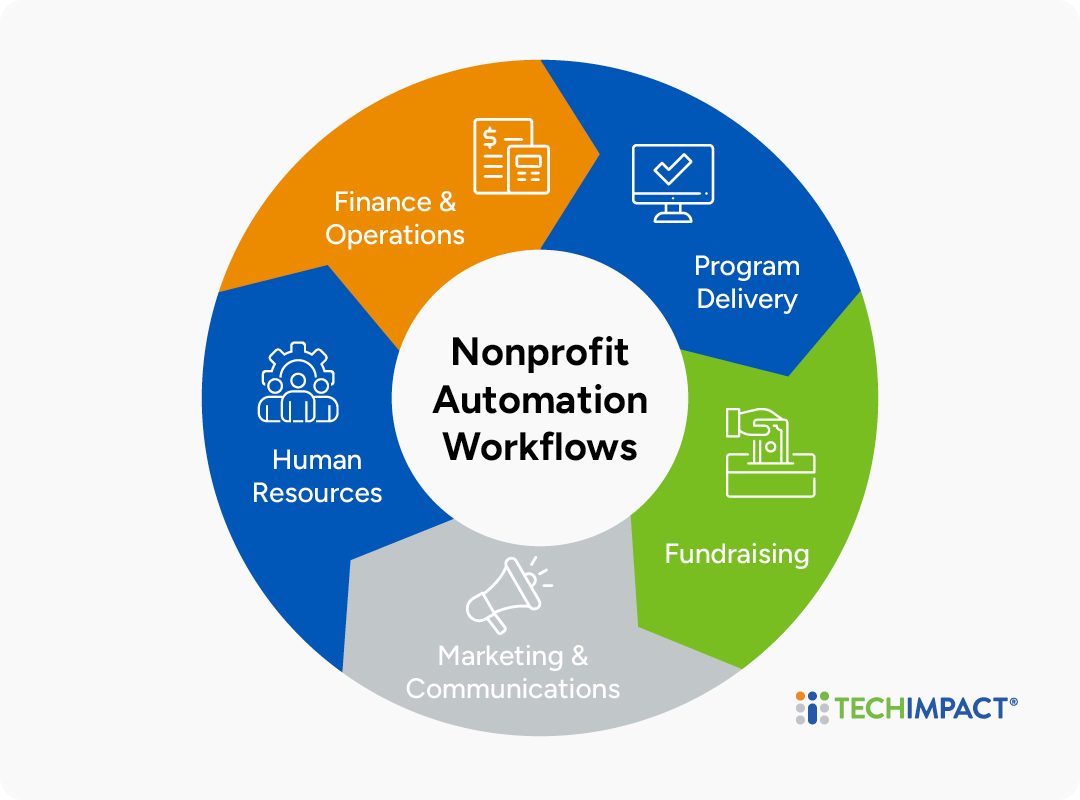
Finance & Operations
Many nonprofits start with finance and operations when developing integrations because these are the backbone of what makes an organization run. Here are a handful of automations to consider for finance and operations.
- Invoicing: Need to get paid for a job well done? Set up your invoicing so that when you’ve reached a specific milestone your invoice is created automatically, routed to the right people internally, and sent out to your client as quickly as possible.
- Time sheets: Get alerts when time sheets are late and send automated reminders to anyone who hasn’t submitted theirs.
- Payroll: Let your payroll system calculate withholdings, pay taxes, and keep track of benefits.
- Expense approvals: Seamlessly collect all the information you need with an easy form, route approvals to the people who need to sign off, authorize payment, and file the information in a safe place.
- Reporting: Automatically collect and send reports to managers, board members, or funders. A dashboard that others can access can make this process even simpler.
- Request for Signature: Set up a document that decisionmakers can digitally sign simultaneously or in a particular order.
- Journal Entries: Keep an accurate and timely record of all transactions by automatically entering recurring or templatized transactions into your organization’s records.
- Billing reminders: Make sure you’re paying bills on time by setting reminders for recurring bills or large payments that need to be managed carefully.
- Ordering supplies: Keep your organization stocked up with essentials by setting up regular orders that are placed automatically.
Programs
The urgency to save time and do more good is often strongest on the program side of an organization. This is also where automations might need to be creative. What you do is unique to your people, your geography, and the problems you’re trying to solve. Here are a few automations that can serve as a starting point:
- Information Delivery: A text bot can help you serve up critical information to constituents looking for legal guidelines, health recommendations, steps for navigating a bureaucratic system, or other forms of guidance.
- Service Delivery: Intake processes, making appointments, managing cases, followup and more can be streamlined with automated processes that keep people in contact and help them focus on the next step.
- Reporting: Integrating systems and creating a dashboard with KPIs and other useful data allow you to get the information you need in one place and to easily share it with funders and stakeholders.
- Project Management: Once you map out the milestones of your project you can use the built-in automations in project management software such as Basecamp, monday.com, or Asana to keep people on task.
- Scheduling: Make it easy to make appointments. An automated scheduler can show people available times, confirm appointments, send important pre-appointment information, add the appointment to participants’ calendars, and send reminders.
- Volunteer Management: Intake volunteers with an easy-to-use form that collects responses and shares them with the team. Once you have a list of volunteers, screen them based on specific requirements, then automatically send approved volunteers a customized listing of upcoming volunteer activities. Once they’ve signed up, an automation can send them information and reminders to help the day go smoothly.
- Assign a Case or Project: After a constituent fills out an intake form, you can automatically assign that person to a staff member using automation rules that consider case load, area expertise, geography, and more.
Fundraising
It can take a lot of time and energy to make sure you’re thanking the right people, nurturing donor relationships, and sharing your good work with the public. Fortunately, many fundraising and communications databases include built-in automations to make your job easier. Here are a few ways to take advantage of the tools that are available:
- Data Maintenance: Automated tools can help you catch duplicates, spot missing information, and review inactive contacts.
- Thank you's: Send receipts and automated thank you emails that include small gifts, personalized engagement opportunities, or useful information.
- Donation Summaries: Donors who like to receive a donation summary during tax season can receive one automatically without requiring a staff member to pull up a donor record and download a report.
- Personalized Messages: Using information in your database you can include personalizations in your emails such as a salutation that includes the recipient’s first name, information that matches a donor’s interests, or upcoming volunteer activities in their area.
- Drip Campaigns: Nurture a donor relationship with a strategic sequence of emails that are timed to maximize engagement or that are triggered by the donor’s actions.
Marketing & Communications
Staying visible and connected with your audience takes consistent effort, but automation can handle many of the repetitive tasks so you can focus on telling your story. Here are a few ways to put it to work:
- Social Scheduling: Create social media posts and schedule them to go live on your social feeds at a specific time or multiple times over the course of a week. Some social media scheduling tools can even optimize your posts to go out when engagement is likely to be highest.
- A/B Message Testing: Not sure which subject line will resonate with your audience? Try two and then count on your broadcast email software to choose the message that gets the most opens. • Website data: If your nonprofit produces data that’s important to your constituents, you can publish it live on your website with a plugin that connects your database
- Targeted Lists: Use the information in your database to quickly compile and implement targeted email lists.
- Website Data: If your nonprofit produces data that's important to constituents, you can publish it live on your website with a plugin that connects your database to your content management system.
Human Resources
You want to make sure your people are taken care of and that you're responsive to HR issues, big and small. Automations can help you remove the smaller, simpler tasks from your plate. Here are a few ideas:
- Applicant management: Screen applicants with an automated tool that can scan resumes. An automated tool can also let applicants know you’ve received their application and provide updates throughout the process.
- Interviews: Schedule interviews without having to wrangle people and juggle calendars. A scheduler can let everyone set their availability, then you can send a link to the applicant that allows them to choose from the windows of time that are available.
- Attachment Saving: Applicants might send cover letters, resumes, work samples, and other materials via email. You can create systems that automatically save those attachments in a particular folder for easy reference.
- Training: A chatbot can guide teammates through a set of information and answer questions along the way.
Tips for Getting Started With Nonprofit Automation
Now that you have some idea of what’s possible with automation, imagine what you can do with it in your own work. Chances are your organization deals with dozens of frustrating, repetitive, time-consuming tasks, but which are good candidates for automation?
Brainstorm Potential Automations Collaboratively
As you brainstorm possible automations, it helps to work with your whole team. Chances are they all could benefit from automation, especially if they do a lot of administrative work, and the more they’re involved in this discovery process, the better the automations you create can be. The following questions can help you and your team uncover opportunities to use automation in your work:
- What are your most repetitive, mundane tasks?
- What takes the most time?
- What frustrates people at your organization the most?
- What tasks are you or someone else at your organization eager to get off your plate?
- Where do breakdowns occur at your organization? What mistakes do people make often?
- Are there times when constituents or members aren’t getting information as quickly as they’d like?
- Are people frequently confused by something?
- Is there something straightforward that you wish your organization could do but would take a lot of time?
Map Processes & Pain Points
Mapping each step of a process is the best way to find your nonprofit's pain points. Work through these steps with your team:
- Pick a process. The more complex or time-consuming it is, the more you stand to gain by automating part or all of it.
- List every step. Nothing is too small. Write down everything that comes to mind—don't worry about order yet.
- Define the start and end points. Knowing what triggers the process and where it ends shows how it connects to other processes.
- Visualize the workflow. Put the steps in sequence and show where decisions branch (for example, a yes/no question leading to two paths) or where steps repeat.
- Use standard symbols. Rectangles for process steps, diamonds for decisions, and ovals for start and end points.
- Flag pain points. Mark the steps that are frustrating, slow, repetitive, or require little thought.
- Review and validate. Check with everyone affected by the process to catch missed steps or misunderstood pain points.
With a complete map, you can start researching automations that address the pain points you've identified, both within your current tools and with new ones. Thousands of automations are possible, so mapping processes and assessing your current capabilities is the best way to find the right fit. Here is a quick checklist:
Steps to Map a Nonprofit Automation Process
Progress
0 of 7 Completed
Assess Each Potential Automation Individually
It is important to spend time assessing whether a particular automation is worth the time and investment, or whether you should put your resources elsewhere. Follow these steps to help decide if an identified automation is a GO or a NO GO:
- Data Collection and Information: The first step is understanding what information you have and what information you want. Then decide whether you know how to analyze and use it.
- Staff Time: The value of automation is often in the time it saves. Is the time your new automation will take to set up and maintain ultimately less than the time staff members currently spend collecting, cleaning, reporting, and analyzing the information?
- Automation Costs: Automation often means new technology. Input the costs associated with implementing and maintaining automation including initial setup, licensing, and maintenance.
- Additional Thoughts: Is there something your automation would allow you to do that you couldn’t do before? Is there anything else that should be factored into the decision (culture, board priority, funding implications, etc.)?
Weighing these factors for each automation helps you invest only where the benefits clearly outweigh the costs, so your team has more time for your mission.
Work With A Nonprofit Consultant
Even the most promising automation can stall without the right expertise behind it. Knowledgeable consultants who understand the nonprofit sector can help you map processes, choose tools that fit your budget and existing systems, and avoid costly missteps, so your automations deliver real time savings instead of new headaches.
They also know the realities nonprofits face, from limited staff capacity to funder reporting requirements, and can design solutions your team can maintain long after launch. At Tech Impact, we partner exclusively with nonprofits to plan, build, and support technology that advances their missions and in our 20+ year history, we've supported over 15,000 nonprofits. Whether you're exploring your first automation or scaling across your organization, our team can help you move from idea to impact with confidence.
Wrapping Up: Additional Resources on Nonprofit Technology
Your community depends on your nonprofit to do as much vital work as possible, often with limited time and staff. Automation takes over the laborious tasks that demand time and energy but little insight, creativity, or strategic thinking. That frees your team to focus on the work that moves your mission forward.
The technology behind automation is more affordable and accessible than ever, and you're likely already using some of it. Start by mapping your processes, flag the pain points, and assess each opportunity on its merits. Small, well-chosen automations in routine tasks, reporting, and data gathering and analysis can add up to a meaningful expansion of your impact.
For more information on nonprofit technology, check out these resources:
- Microsoft 365 for Nonprofits: A Complete Tool Overview
- How To Make Cybersecurity a Team Priority
- Nonprofit's Guide to A Smooth Data Migration
Related Resources


All-Access Pass
Technology keeps advancing, which means we all have to keep learning and building our skills. Get more learning with less cost by getting the All-Access Pass, which grants you unlimited access to the Technology Learning Center.