
Microsoft Intune for Nonprofits: What It Is & How To Use It


Nonprofits increasingly rely on cloud-based systems like Microsoft 365 to collaborate, store sensitive information, and support programs from anywhere.
That flexibility is essential, but it also means data may be accessed across many devices, locations, and user accounts, which makes strong security practices critical for protecting donor records, client information, financial data, and organizational operations.
That’s where Microsoft Intune comes in. Intune helps nonprofit IT teams manage and secure the devices that connect to Microsoft 365, giving organizations more control over access, compliance, and protection without adding unnecessary complexity. In this guide, you’ll learn all you need to know about Microsoft Intune for nonprofits, including:
- Microsoft Intune for Nonprofits FAQ
- Key Features of Microsoft Intune for Nonprofits
- How Tech Impact Can Help With Microsoft Intune Implementation
- Additional Resources on Nonprofit Cybersecurity
Let’s begin by reviewing what Microsoft Intune is and how it can benefit nonprofits like yours.
Microsoft Intune for Nonprofits FAQ
What Is Microsoft Intune?
Microsoft Intune is a cloud-based tool that helps nonprofits keep their data safe across all types of devices, whether they belong to the organization or are the personal phones of volunteers. If you handle donor data, client records, medical information, or confidential program documents, device control is essential.
Intune provides a centralized way to enforce security policies, manage devices, and safeguard data whether staff work in the office, remotely, or on their own devices.
How Can Microsoft Intune Help My Nonprofit Secure Its Data?
There are two main ways Microsoft Intune can help protect data:
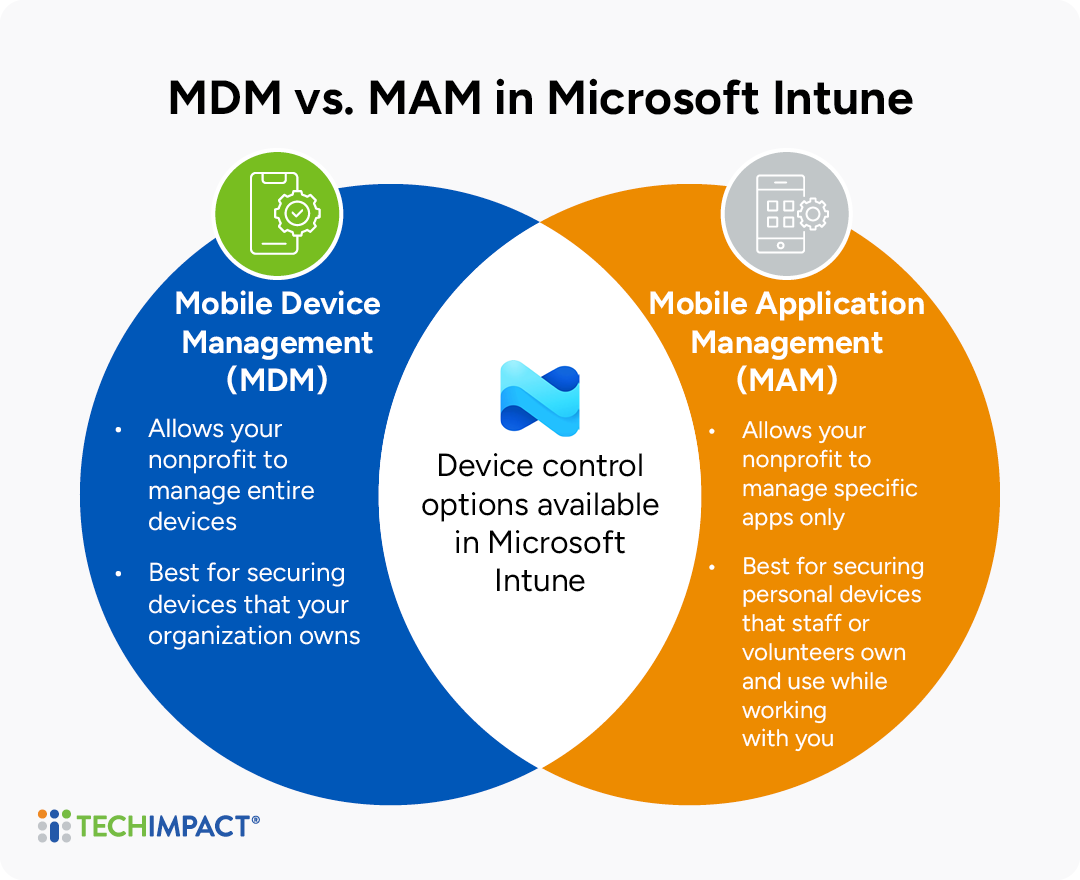
- Mobile Device Management (MDM): MDM allows the organization to manage an entire device, and best used for company-owned laptops and cell phones. For instance, if a laptop is stolen, IT staff can lock or wipe it completely to protect donor or client records
- Mobile Application Management (MAM): MAM is best for personal or volunteer devices that are individually owned, but have apps that can access organizational data. MAM keeps personal photos and text private, while securing only the work apps, like Outlook and Teams. IT staff can delete work emails from a volunteer's phone when they leave without touching personal files.
Having the flexibility to control an entire device or just specific apps, allows IT staff to keep organizational data secure, without overstepping into personal files and communications.
Why Should My Nonprofit Use Microsoft Intune?
In addition to its flexibility, Microsoft Intune offers several important benefits for nonprofits, including:
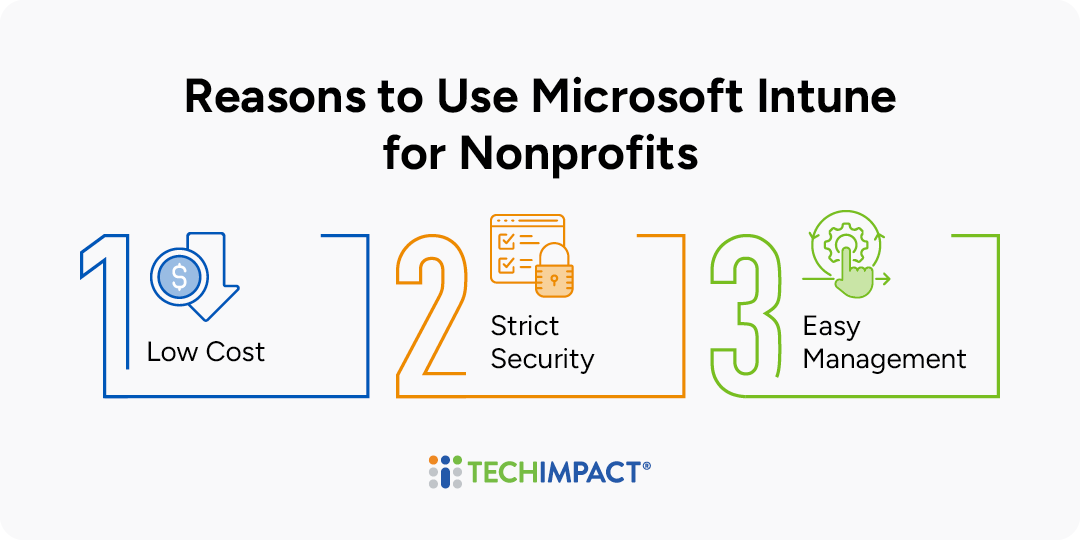
- Low Cost: Most nonprofits can get discounted licenses through Microsoft 365 Business Premium For Nonprofits
- Strict Security: Intune ensures that only “healthy” devices with passwords and updates can access sensitive information.
- Easy To Manage: You can manage Windows, Mac, iPhone, and Android devices all from one central website, saving time for small IT teams.
Microsoft Intune is particularly valuable for nonprofits with remote or hybrid staff, multiple devices, or a growing reliance on Microsoft 365. If employees access organizational data from laptops, phones, or personal devices, Intune provides a centralized way to secure data, enforce security policies, deploy applications, and manage devices from anywhere. Organizations that struggle with device setup, software updates, lost devices, or maintaining security across a distributed workforce can greatly benefit as well.
Is Microsoft Intune Free For Nonprofits?
Microsoft Intune is not completely free for nonprofits, but many nonprofits can access it at a significant discount through Microsoft nonprofit licensing programs. Intune is included with certain Microsoft 365 plans, such as Microsoft 365 Business Premium, which Microsoft often offers to eligible nonprofits at reduced or donated rates. Organizations already using an eligible Microsoft 365 subscription may already have access to Intune without purchasing it separately.
How Can My Nonprofit Get Started With Microsoft Intune?
Before you sign up for Intune, determine if your organization already uses Microsoft Entra ID (formerly AzureAD) which supports work accounts that you use with other Microsoft online services (365 and Azure for example).
To add an Intune subscription to an existing Entra tenant, you must use an account that is assigned an Entra ID built-in role with sufficient permissions to add Intune.
Key Features Of Microsoft Intune for Nonprofits
Intune provides centralized, automated protection for every device connected to your nonprofit's Microsoft 365 environment, allowing IT teams to enforce security policies, deploy updates, manage applications, and protect organizational data from a single cloud-based platform. Here are key features you should know about:
Key Features of Microsoft Intune for Nonprofits
Mobile Device Management (MDM)
Provides centralized control over organization-owned laptops, tablets, and smartphones.
Mobile Application Management (MAM)
Protects organizational data inside Microsoft 365 apps without controlling entire devices.
Identity & Access Control
Blocks suspicious or unauthenticated sign-ins.
Data Protection & Compliance
Automatic encryption and restriction for sensitive data.
Endpoint Security
Secures devices against cyber threats by enforcing security baselines and integrating with Microsoft Defender.
Automation & Modern Deployment
Configure new devices automatically with applications, settings, and security policies.
Reporting & Analytics
Gives visibility into device health, compliance, and performance.
Need help setting up or managing Microsoft Intune at your nonprofit?
Now, let's dive deeper into each one:
Device Management (MDM)
Mobile Device Management (MDM) gives nonprofits centralized control over staff laptops, tablets, and phones. IT can automatically enforce security policies, deploy updates, and ensure devices meet organizational standards before accessing Microsoft 365.
For example, IT can require strong passwords, enable encryption, and push updates to all staff devices. If a laptop is lost or stolen, organizational data can be remotely wiped to reduce security risks.
Application Management (MAM)
Mobile Application Management (MAM) protects organizational data inside apps such as Outlook, Teams, and OneDrive without requiring full control of a personal device. This makes it ideal for BYOD environments, volunteers, and contractors.
For example, a volunteer coordinator can use a personal phone to access work email while restrictions prevent copying data into personal apps or saving files to unsecured locations. If they leave, only organizational data is removed.
Identity & Access Control
Intune works with Microsoft Entra ID and Conditional Access to support a Zero Trust security model. Access decisions can be based on user identity, location, device health, and multifactor authentication status.
For example, if someone attempts to sign in from an unusual location, access can be blocked until MFA is completed and the device meets compliance requirements.
Data Protection & Compliance
Intune helps protect sensitive information wherever it is accessed, supporting nonprofits that handle donor, financial, client, or regulated data. Security controls can follow the data beyond the organization's network.
For example, a spreadsheet containing sensitive information can be automatically encrypted and restricted so that only authorized users can open or share it, even after it leaves the organization.
Endpoint Security
Endpoint Security helps nonprofits harden devices against cyber threats by enforcing security baselines and integrating with Microsoft Defender. This reduces risk and improves response to security incidents.
For example, if a user clicks a malicious link, Defender can detect suspicious activity while Intune helps ensure remediation policies and security updates are applied quickly.
Automation & Modern Deployment
Intune simplifies device deployment with cloud-based automation. New devices can be configured automatically with applications, settings, and security policies without IT staff physically touching them.
For example, new hires can receive laptops directly from a vendor. Using Windows Autopilot, devices automatically enroll in Intune and configure themselves when the employee signs in.
Reporting & Analytics
Intune provides visibility into device health, compliance, and performance through centralized dashboards and reporting tools. This helps IT teams identify and resolve issues faster.
For example, an IT manager can quickly identify devices with outdated patches or poor performance and deploy updates across the environment from a single console.
Other Essential Capabilities
The key features listed above are not the only beneficial tools within Intune. Below is a chart that includes additional features, and whether it is included in most licenses.
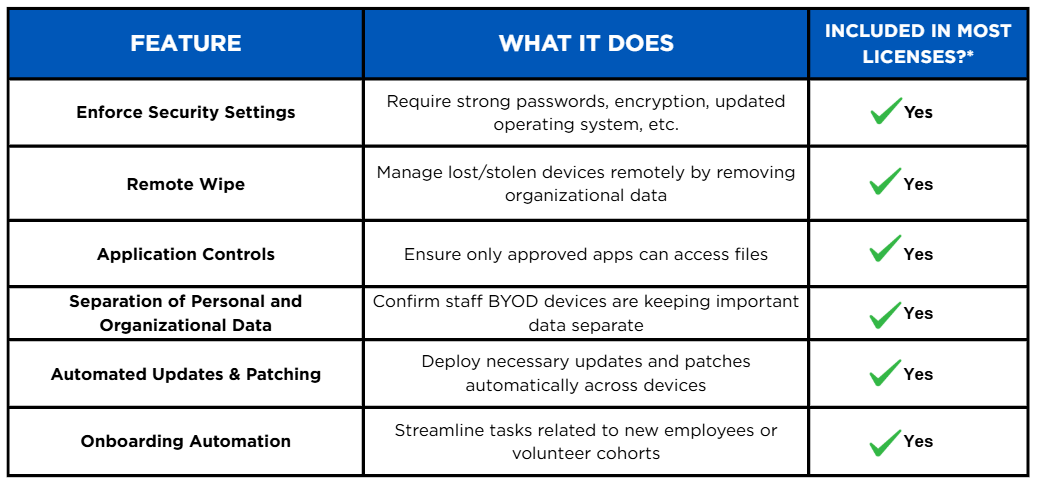
**Actual availability depends on your nonprofit Microsoft 365 plan (e.g., Business Premium, E3, or E5 Nonprofit).
How Tech Impact Can Help With Microsoft Intune Implementation
Tech Impact helps nonprofits put Microsoft Intune and Microsoft 365 security features to work in practical, mission-focused ways. Our team can assess your current Microsoft 365 environment, identify gaps in device and data protection, and configure tools such as Intune, multi-factor authentication, Microsoft Entra ID, sensitivity labels, email encryption, and access policies to help protect donor, client, and organizational information.
The goal is not just to turn on security features, but to make sure they are implemented in a way that fits your staff, devices, compliance needs, and day-to-day operations.
Microsoft Intune support is part of Tech Impact’s broader cybersecurity and Microsoft cloud services for nonprofits, including security risk assessments, data protection and data loss prevention, endpoint management, identity management, compliance support, sensitive document management, advisory services, and employee cybersecurity training.
Because Tech Impact is a nonprofit, we understand the resource constraints, staffing realities, and mission-driven priorities nonprofits face. That means our recommendations and services are designed to be realistic, affordable, and sustainable, helping your organization strengthen security without losing sight of the people and programs you serve. Whether you have a security incident, just like the one Midwest Assistance Program faced, or are needing extra advisory services for high-risk activities like Arts and Humanity Council.
Additional Resources on Nonprofit Cybersecurity
Keeping organizations secure is a top focus for Tech Impact. For more information on data compliance for nonprofits, check out these resources:
- How to Prepare for a Cybersecurity Audit
- Creating a Culture that Values Security at your Nonprofit
- Nonprofits Guide to Data Migration
Related Resources


All-Access Pass
Technology keeps advancing, which means we all have to keep learning and building our skills. Get more learning with less cost by getting the All-Access Pass, which grants you unlimited access to the Technology Learning Center.