
How to Get Started With Microsoft Purview for Nonprofits


For nonprofits, data governance and compliance are essential to protecting donor information, program records, financial data, and other sensitive content that supports mission-critical work.
As more organizations rely on cloud-based systems like Microsoft 365 for collaboration, file storage, email, and AI-enabled tools, IT teams need clear policies and practical controls to know where data lives, who can access it, how long it should be retained, and how to reduce the risk of accidental exposure.
That’s where Microsoft Purview comes in. Purview gives nonprofit IT managers a centralized way to discover, classify, protect, and govern data across Microsoft 365, helping organizations strengthen compliance, reduce risk, and build the foundation for responsible cloud and AI use.
In this guide, you’ll learn all you need to know about Microsoft Intune for nonprofits, including:
- Microsoft Purview for Nonprofits FAQ
- Key Features of Microsoft Purview for Nonprofits
- How Tech Impact Can Help With Microsoft Purview Implementation
- Additional Resources on Nonprofit Data Compliance
Let’s begin by discussing what Microsoft Purview is and its benefits for nonprofits.
Microsoft Purview for Nonprofits FAQ
What Is Microsoft Purview?
Microsoft Purview is Microsoft’s data governance, security, and compliance platform for Microsoft 365 and Azure. It helps organizations find, classify, protect, and manage sensitive data across email, Teams, SharePoint, OneDrive, on-premises systems, and other cloud environments.
For nonprofits, this matters because donor records, volunteer information, grant files, and program data all require strong protection and responsible handling to meet privacy and compliance expectations. In short, Microsoft Purview helps nonprofits understand what data they have, protect it appropriately, and demonstrate that it is being managed responsibly.
If Microsoft Defender helps protect your devices and identities, Microsoft Purview helps protect your data, wherever it lives or moves.
Why Should My Nonprofit Use Microsoft Purview?
Microsoft Purview can provide many benefits to your nonprofit, including helping you:
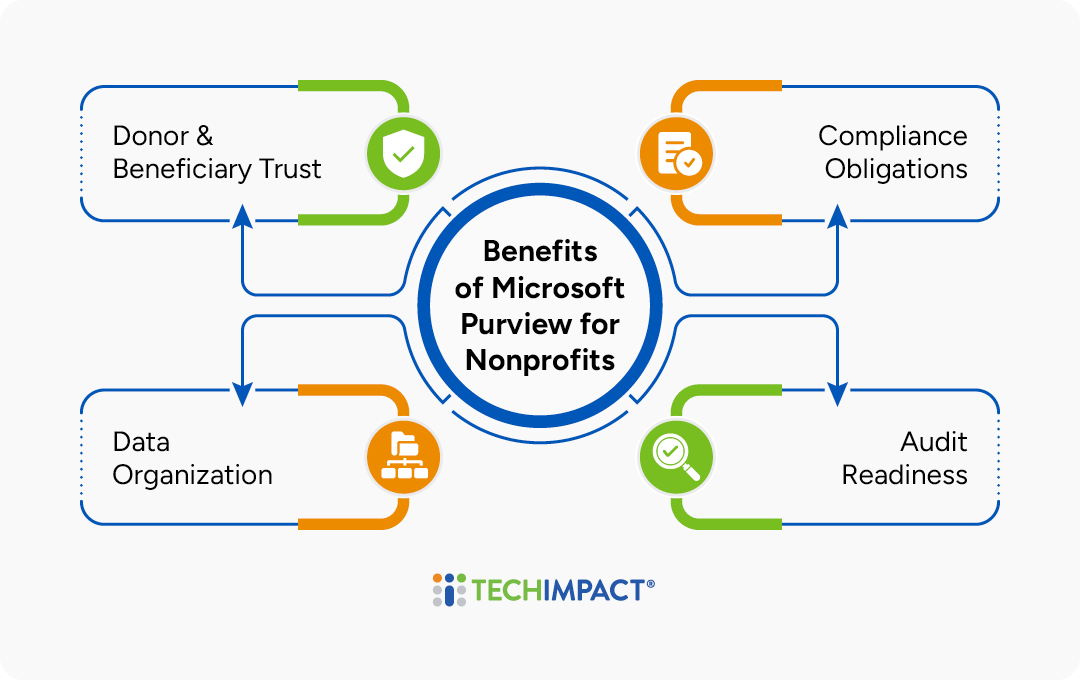
- Protect Donor & Beneficiary Trust: Encryption and Data Loss Prevention help stop accidental or malicious exposure of donor and client data. Purview can ensure sensitive information is only shared with the right people, reducing the risk of privacy breaches that can damage trust and credibility.
- Meet Compliance Obligations: Retention policies and Compliance Manager help demonstrate compliance to funders, regulators, or auditors. This gives nonprofit IT teams a more structured way to document controls, manage records, and show that sensitive data is being handled responsibly.
- Be Audit-Ready: With eDiscovery and audit logs, you can quickly answer questions like “Who accessed this file?” or “What data was shared externally?” These tools help IT managers respond faster to internal reviews, legal requests, funder inquiries, or security investigations.
- Prevent Data Chaos: Retention and classification tools help prevent data sprawl, especially when staff or volunteers come and go. Purview makes it easier to keep important records organized, remove outdated content appropriately, and maintain continuity as teams change.
How Much Does Microsoft Purview Cost for Nonprofits?
Microsoft Purview pricing for nonprofits depends on which Purview capabilities you need and whether you're already licensed for Microsoft 365. Microsoft does not offer a single "Purview license", rather many Purview features are included in Microsoft 365 plans, while advanced capabilities require add-ons.
For nonprofit organizations, the most common options are:
Microsoft 365 E5 Nonprofit: This includes premium Microsoft Purview compliance and data governance capabilities as part of the broader E5 suite.
Microsoft Purview Suite (Nonprofit pricing): Additional add-on for eligible nonprofit tenants. This provides advanced compliance, data security, and governance features beyond what's included in base Microsoft 365 licensing.
Some Purview services are also available on a pay-as-you-go consumption model through Azure, with costs based on usage rather than per-user licensing.
* See Microsoft's website for more pricing information.
How Can My Nonprofit Get Started With Microsoft Purview?
Purview isn’t a separate app you install, rather it’s built into the Microsoft 365 Compliance Portal. From there, you'll find sections like:
Core Capabilities of Microsoft Purview for Nonprofits
Information Protection
Identify & apply protections to sensitive data.
Data Loss Prevention
Define rules to block sensitive data sharing.
Data Lifecycle Management
Develop & follow record retention policies.
Audit/eDiscovery/
Insider Risk
Explore user investigation, risk management, & reporting tools.
Need help setting up or managing Microsoft Purview at your nonprofit?
- Information Protection: Create, manage, and audit sensitivity labels. This helps nonprofits identify sensitive content, such as donor or beneficiary data, and apply protections like encryption, access restrictions, or visual markings.
- Data Loss Prevention: Define rules to stop sensitive data sharing. DLP policies can help prevent information like Social Security numbers, financial records, or donor lists from being emailed, downloaded, or shared outside the organization when it should remain protected.
- Data Lifecycle Management: Manage retention policies. This helps nonprofits keep required records for the right amount of time and remove outdated files responsibly, reducing clutter and compliance risk.
- Audit/eDiscovery/Insider Risk: Explore investigation and reporting tools. These features help IT teams review user activity, locate relevant content for audits or legal requests, and identify risky behavior before it leads to data exposure.
Because these tools work across the Microsoft 365 suite, nonprofits can apply consistent data protection wherever work happens. For example, labeling sensitive donor files in SharePoint, preventing confidential information from being shared in Outlook, or retaining Teams messages for compliance review.
Key Features of Microsoft Purview for Nonprofits
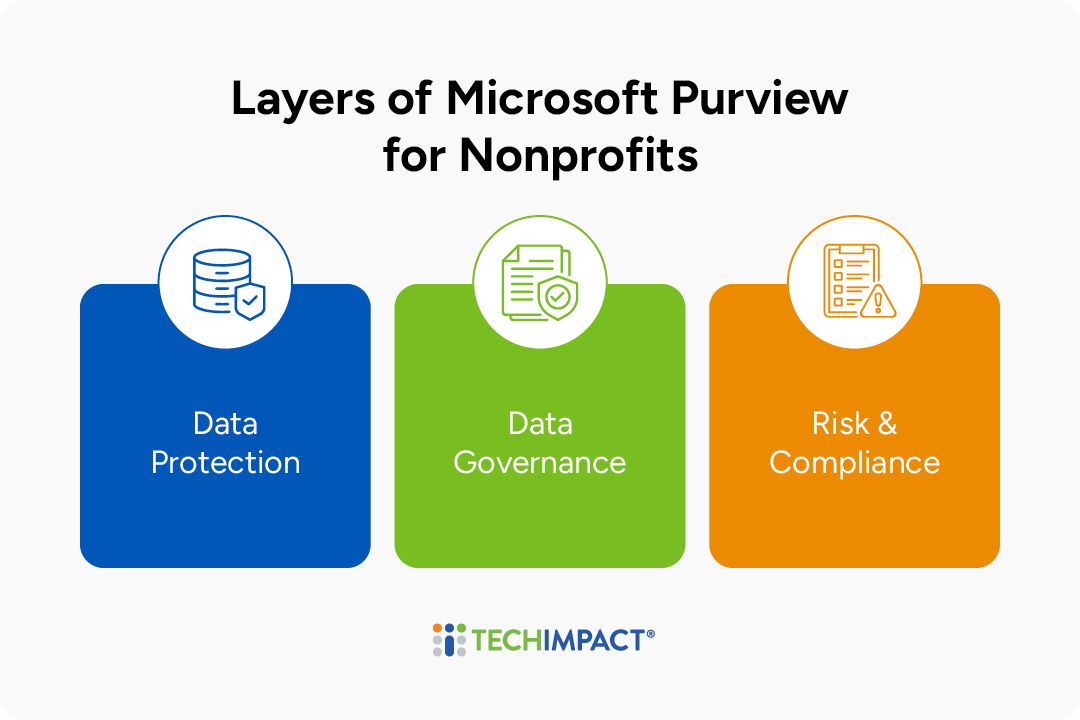
Think of Microsoft Purview as three connected layers working together to help nonprofits protect sensitive information, manage data responsibly over time, and demonstrate compliance when questions arise. Together, these layers give IT managers a practical framework for reducing risk across Microsoft 365 without treating security, governance, and compliance as separate efforts:
Data Protection:
This layer focuses on identifying sensitive information and applying the right protections wherever that data is stored or shared. In Microsoft Purview, this can include sensitivity labels, encryption, access restrictions, and Data Loss Prevention policies that help prevent confidential information from being exposed accidentally or intentionally.
For example, a nonprofit could use sensitivity labels to encrypt donor lists, restrict access to volunteer medical information, or prevent staff from sending files with Social Security numbers or financial data outside the organization. This helps nonprofit IT managers protect trust while still allowing staff to collaborate securely in tools like SharePoint, OneDrive, Outlook, and Teams.
Data Governance:
This layer focuses on how information is organized, retained, and disposed of throughout its lifecycle. With retention policies and records management, Purview helps nonprofits keep important files for the right amount of time, reduce outdated or duplicate content, and apply consistent rules across Microsoft 365.
For example, an organization could keep grant records for seven years to meet funder or regulatory requirements, then automatically delete them when they are no longer needed. This gives IT teams a more reliable way to manage records as staff, programs, funding requirements, and compliance needs change over time.
Risk and Compliance:
This layer helps nonprofits monitor activity, investigate issues, and demonstrate that data is being managed appropriately. Tools like Audit, eDiscovery, Insider Risk Management, and Compliance Manager can help IT teams understand what happened, respond to information requests, and document compliance efforts for leadership, funders, auditors, or regulators.
For example, if a funder asks how sensitive client data is protected, or if leadership needs to know whether a confidential file was shared externally, Purview can help provide the activity history and supporting evidence. These capabilities make it easier for nonprofits to respond quickly to audits, data requests, internal reviews, or potential security incidents.
Other Essential Capabilities
Additional features listed below are core to the platform and woven into the other capabilities: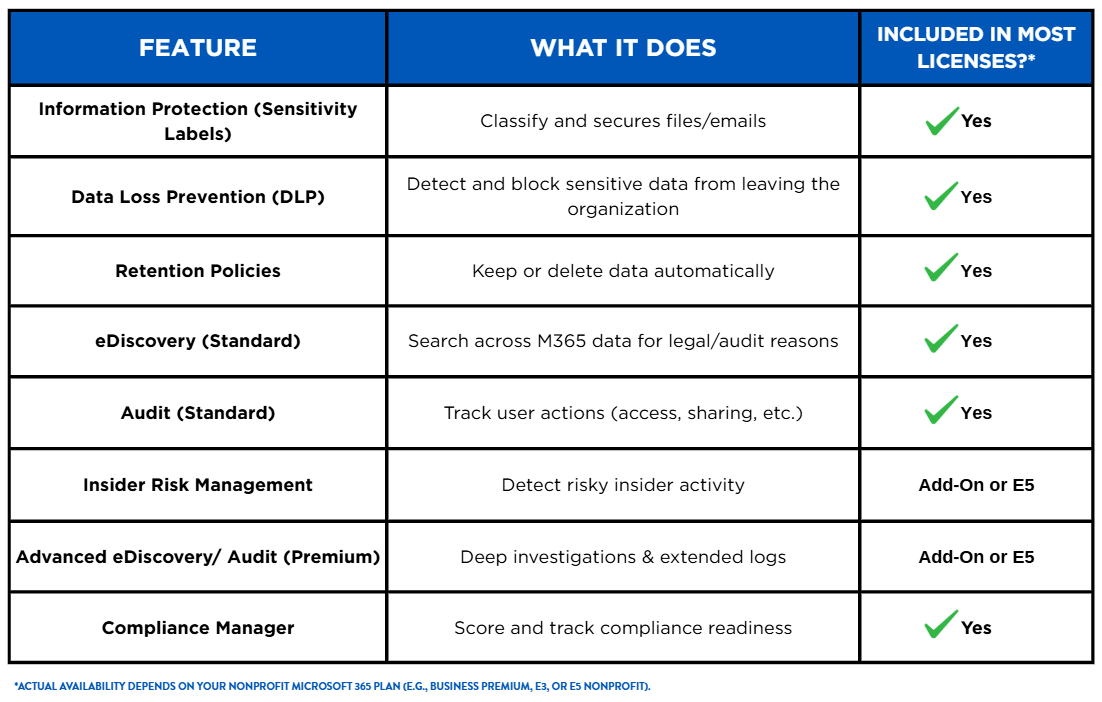
How Tech Impact Can Help With Microsoft Purview Implementation
Tech Impact works with nonprofits to bring Microsoft Purview’s compliance and governance capabilities into settings, policies, and workflows that are useful in the real world.
We can help review your Microsoft 365 environment, uncover areas where sensitive data may be exposed or unmanaged, and set up tools such as sensitivity labels, Data Loss Prevention, retention policies, audit logs, eDiscovery, and access controls to better protect donor, client, financial, and operational information.
Rather than simply enabling features, the priority is to build a data management approach your team can actually follow, that helps staff locate, classify, secure, retain, and review information in alignment with your policies, reporting needs, and daily operations.
This support fits within Tech Impact’s broader Microsoft cloud and cybersecurity work, which includes compliance planning, data protection, Data Loss Prevention, retention and records guidance, sensitive document handling, identity and access controls, security assessments, strategic advising, and staff training.
As a nonprofit ourselves, Tech Impact understands that strong compliance programs must also be practical for lean teams and limited budgets. Our guidance is designed to help organizations strengthen data governance in a way that is manageable, cost-conscious, and aligned with the communities, programs, and missions they support.
Additional Resources on Nonprofit Data Compliance
Keeping organizations secure and compliant is a top focus for Tech Impact. For more information on data compliance for nonprofits, check out these resources:
- We Know Why Copilot Isn't Working Like You Expected
- Why You Need A Computer Use Policy
- Nonprofit Guide To Data Migration
Related Resources


All-Access Pass
Technology keeps advancing, which means we all have to keep learning and building our skills. Get more learning with less cost by getting the All-Access Pass, which grants you unlimited access to the Technology Learning Center.